
Custom Voice Hooter: Build a Talking Alarm That Fits Your Plant
A standard hooter makes one sound for every emergency. A custom voice hooter speaks your message, in your language, at the moment you choose.
No two plants are alike. A cold storage unit worries about temperature breaches. A forging shop worries about press faults. A warehouse worries about forklifts and pedestrians. A ready-made siren cannot tell these people what is happening at their site. A custom voice hooter can.
This guide explains what a custom voice hooter is, what can be customised, how the process works and what to ask before you order.
1. What Is a Custom Voice Hooter?
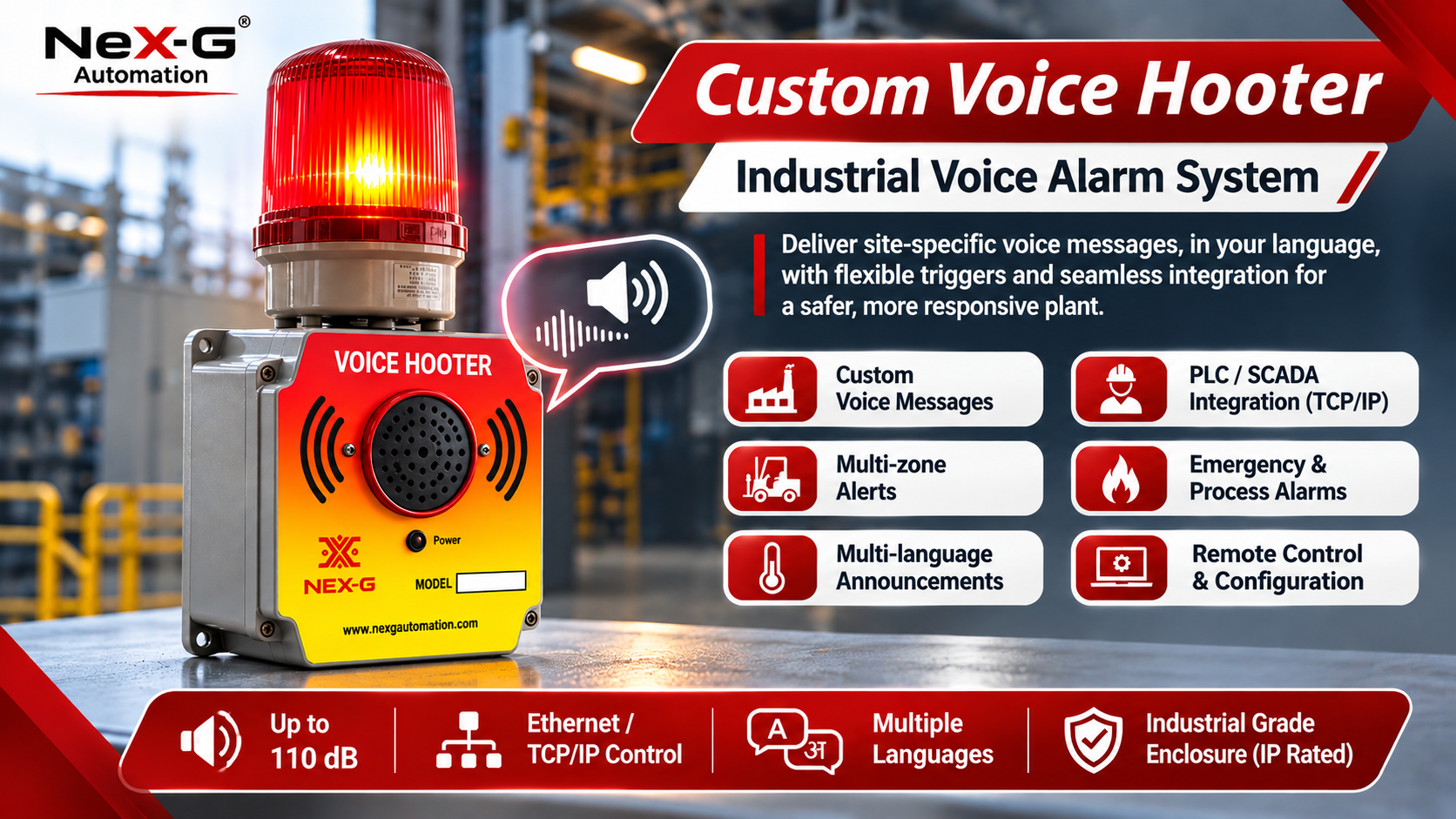
A custom voice hooter is an industrial alarm that plays voice messages written and recorded for your site, optionally mixed with alarm tones. You decide the wording, the language, the voice, the volume behaviour and what triggers each message.
For example, instead of a plain siren you might hear "Furnace temperature high, operator to Bay 3" or "Forklift approaching, stay clear of the aisle."
2. Standard Hooter vs Custom Voice Hooter
| Feature | Standard hooter | Custom voice hooter |
|---|---|---|
| Sound | Fixed siren or buzzer | Your own spoken messages plus optional tones |
| Messages | None or a few preset tones | As many as your site needs |
| Language | None | Hindi, English, Kannada or any local language |
| Triggers | One relay input | Many inputs, each linked to its own message |
| Control | Local switch | Local, or remote over TCP/IP |
| Fit to your site | Generic | Built around your layout and process |
3. What Can You Customise?
Message content. Write the exact wording for each event, such as fire, gas leak, machine fault, temperature breach, shift change or visitor warning.
Language. Record each message in one or more languages so every worker understands it the first time.
Voice and delivery. Choose a male or female voice, pace and tone, calm for notices and firm for emergencies.
Alarm tones. Add a siren or chime before the voice so people look up and listen.
Triggers. Link each message to a relay input, a PLC output, a sensor, a push button or a network command.
Priority and repeat rules. Let an emergency message override a routine one, and set how often a message repeats.
Network and integration. Ethernet and TCP/IP control so PLC, SCADA or custom software can trigger messages remotely.
Power and enclosure. Match the supply voltage, backup power and housing to your plant conditions.
Message updates. Change or add messages later as your site, process or workforce changes.
4. How a Custom Voice Hooter Project Works
The exact steps depend on your requirement, but a typical project looks like this:
Share your requirement. Tell us the site, the events you want announced and the systems that will trigger them.
Write the message list. Together we list each event, its wording, its language and its priority.
Record and test. Messages are recorded and checked for clarity, ideally on site with machines running.
Configure triggers. Each input or network command is mapped to its message.
Install and train. The hooter is mounted, connected and tested with your safety team.
Update when needed. Messages can be revised later without redesigning the system.
Because Nex-G Automation designs its own electronics, firmware and software in-house, the hardware and the message logic can be shaped together instead of forced into a catalogue product.
5. Example Message Plans by Industry
| Site | Trigger | Sample message |
|---|---|---|
| Factory | Machine fault from PLC | "Press 2 fault, maintenance to Bay 3." |
| Warehouse | Forklift proximity sensor | "Forklift approaching, stay clear." |
| Cold storage | Temperature sensor limit | "Cold room 4 temperature high, check door." |
| Water treatment plant | Tank level switch | "Tank level low, start the transfer pump." |
| Campus or hospital | Emergency button | "Emergency in Block A, please follow exit signs." |
| Office or BFSI site | Access control alarm | "Unauthorised entry at the server room." |
6. Integration with PLC, SCADA and Network Systems
A custom voice hooter becomes most useful when it responds on its own. It can be triggered by:
PLC digital outputs
SCADA alarms and events
Fire panels and gas detectors
Temperature, level and process sensors
Forklift and worker safety systems
Custom software or a mobile app over TCP/IP
This builds on the same network principles as our Ethernet IP hooter, explained in our post on how a network hooter works. It also fits into a wider industrial Ethernet alarm system.
7. Benefits of a Custom Voice Hooter
Faster reaction: people know what is happening and what to do immediately.
Your workforce, your language: speak to every worker in the language they understand best.
Fewer false alarms and panics: a clear message separates a drill from a real event.
Fits your process: messages match your equipment names, zone names and procedures.
Easy to change: update the wording when layouts, processes or rules change.
Better compliance: supports your internal safety and evacuation procedures.
8. How to Choose a Custom Voice Hooter Supplier
Ask these questions before you order:
Do you design the hardware and firmware yourself, or only resell?
Can you record messages in my languages and let me update them later?
How many messages and trigger inputs are supported?
Is the speech clear over background noise, and what sound level and enclosure rating do you offer?
Can it be triggered over TCP/IP, and is documentation provided?
Can emergency messages override routine ones?
Is there backup power for alarms during a power failure?
What warranty, spares and after-sales support do you offer?
If you also need a standard alarm, read our guide to choosing an industrial hooter manufacturer in India.
9. Tips for Writing Custom Voice Messages
Keep each message under about 10 seconds.
Say what is happening first, then what to do.
Use simple, calm words and avoid jargon.
Repeat the message once.
Use the same names for zones and machines that workers already use.
Test in the real environment with machines running.
Have a native speaker record each language.
For general guidance on emergency voice communication and alarm signalling, see NFPA and OSHA.
Always confirm the requirements that apply to your site.
10. Frequently Asked Questions
What is a custom voice hooter?
A custom voice hooter is an industrial alarm that plays voice messages written and recorded for your site, with the triggers, languages and tones you choose.
Can I get my own messages recorded in the hooter?
Yes. Messages, wording and languages can be tailored to your plant, and updated later as your needs change.
Can a custom voice hooter speak in Hindi, English and Kannada?
Yes. Messages can be recorded in several languages, depending on the device and your requirement.
Can a custom voice hooter be controlled remotely?
Yes. A network-based unit can be triggered from a PC, PLC, SCADA system or app over TCP/IP.
Can it connect to my existing PLC or alarm panel?
In most cases, yes. It can be triggered by relay outputs or network commands.
How is it different from a normal voice hooter?
A normal voice hooter ships with fixed messages. A custom one is built around your own messages, languages, triggers and hardware needs.
11. Get a Custom Voice Hooter Built for Your Site
Nex-G Automation designs and develops custom hooters and alarm systems in-house, so we can match messages, languages, triggers and hardware to your plant.
Contact our team with your requirement and we will suggest the right voice alarm setup.